The stage manager
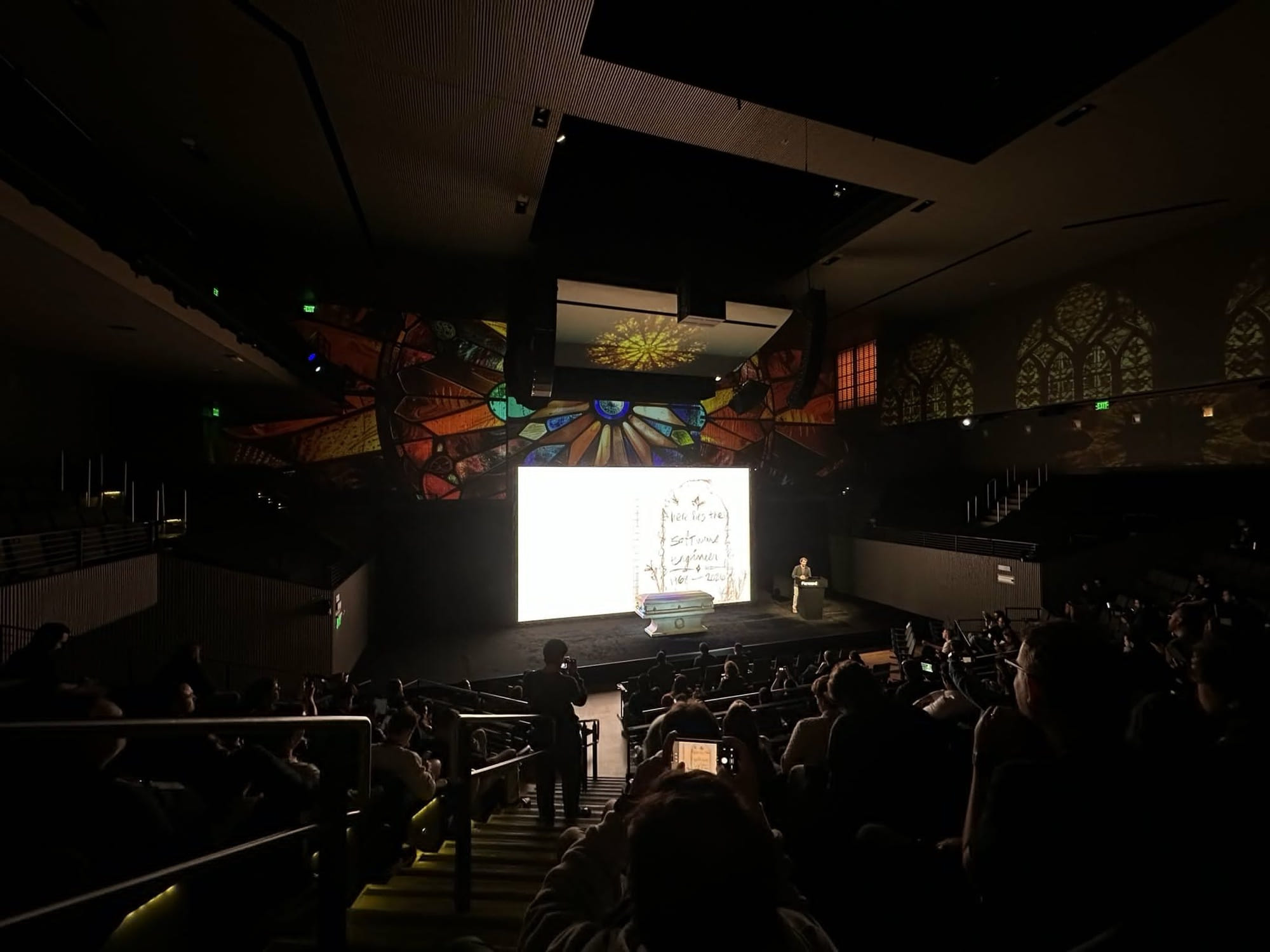
On October 21 I stood next to a casket at Resend Forward and gave a eulogy for the software engineer. My props were a pair of Sony XM5 headphones, a Field Notes notebook and a CODE mechanical keyboard (the one Jeff Atwood of Coding Horror designed), and behind me a 21-foot screen ran a slide deck that was listening to every word I said.
Theater has a name for the person who makes that work: the stage manager. They sit in the dark with the prompt book, the script marked up with every light change and sound cue, and they call each one the moment the actor hits the line.
“Standby lights 42… go.”
The actor never thinks about it. They say the line and the world changes around them.
I wanted a stage manager. I couldn't hire one, so I built one in the browser.
Slides as data
The talk started life in Google Slides. A few weeks out I exported it to PowerPoint and wrote a little Python script that cracked the .pptx open and turned every slide into JSON: background, images, text boxes positioned as percentages of the frame, and the speaker notes, which were already full of cues like “Crossfade 2s” and the phrase that should bring the slide up.
Once the slides were data, Keynote's whole job (holding a pile of rectangles and flipping between them) became a few hundred lines of JavaScript. More importantly, every slide could now carry its own cue:
{
  cue: { phrase: 'painting their first office Faded Denim' },
  // ...what's on the slide, how it builds, how long it holds
}
That phrase is my exact wording from the script. It's the line the stage manager listens for.
The deck I actually gave the talk with is the second version. I called it the order of service, eighty-odd slides printed pale on black like a funeral program, written fresh against the final script. The imported Google Slides deck is still in there behind a ?classic flag, a dress rehearsal that never made it to opening night.
Listen
Chrome ships speech recognition in the browser through the Web Speech API, and it's good enough to be dangerous. You make a SpeechRecognition, turn on continuous so it keeps listening and interimResults so you get its guesses while you're still mid-sentence, and it hands you a running stream of words:
const r = new webkitSpeechRecognition();
r.continuous = true;
r.interimResults = true;
r.lang = 'en-US';
r.processLocally = true; // keep the audio on this machine
r.onresult = (e) => { /* the latest guesses, final and provisional */ };
r.onend = () => r.start(); // it quits after a silence, so start it again
r.start();
Interim results are what make it feel live. Chrome resends the sentence you're in the middle of, a little longer and a little more corrected each time, until it settles and marks it final. The deck matches cues against those provisional guesses, so a slide can land halfway through a sentence instead of waiting for me to stop talking. It also remembers which words already fired a cue, so the corrected resend of the same sentence can't fire it twice.
That processLocally line matters more than it looks. By default, Chrome ships your audio off to Google's servers to be transcribed. Since Chrome 139 it can do the work on your own machine instead, as long as it has downloaded a language pack first. Ask for local processing without the pack installed and start() fails with a language-not-supported error, so the deck catches that and falls back to the online recognizer rather than going deaf in front of a room.
Match
The temptation with a stream of words is to wire “heard the phrase” straight to “next slide” and call it a day.
That falls apart the first time you say the phrase slightly wrong, or the recognizer hears “Spolski” for Spolsky, or you say a common phrase two slides early. On stage, a deck that jumps ahead is worse than a deck that doesn't move at all. So most of the code in voice.js is rules about when not to advance.
The fuzzy matching earned its keep fast. The recognizer kept mangling “Linus Torvalds” into “Lee noose” and “tour vaults,” so both of those are now in the slide's list of ways the name might come out, which is a strange thing to commit to a repo.
// How many words of the phrase must be heard before advancing: the whole
// phrase when it's short, the first ~60% when it's long, so the slide lands
// while the line is still being said.
export function wordsNeeded(phraseLength) {
  if (phraseLength <= 3) return phraseLength;
  return Math.max(3, Math.ceil(phraseLength * 0.6));
}- It only moves forward Nothing I say can send the deck backwards.
- Long cues fire early A long phrase advances once I've said the first 60% of it, so the slide lands while the sentence is still coming out of my mouth. Short ones, like names, need every word.
- One slip is fine One extra word, one missing word, or one word garbled into something else still counts, and individual words match on edit distance so mangled names get through.
- A missed cue doesn't strand me It also listens for the cues of the next two slides, said nearly whole, plus a few backup lines per slide. If it misses one, the next line it recognizes catches it up.
- Actions never auto-advance A slide whose cue is me lifting the keyboard, or five seconds of silence, has no phrase at all. The presenter view just says “Clicker: no spoken cue.”
- The clicker always wins Pressing it clears everything the deck has heard.
Go
Some slides write themselves as I talk. The chalkboard “Nothing you built was wasted” wipes in word by word as I say it, and a few others reveal one line at a time when their words come up, in whatever order I happen to say them.
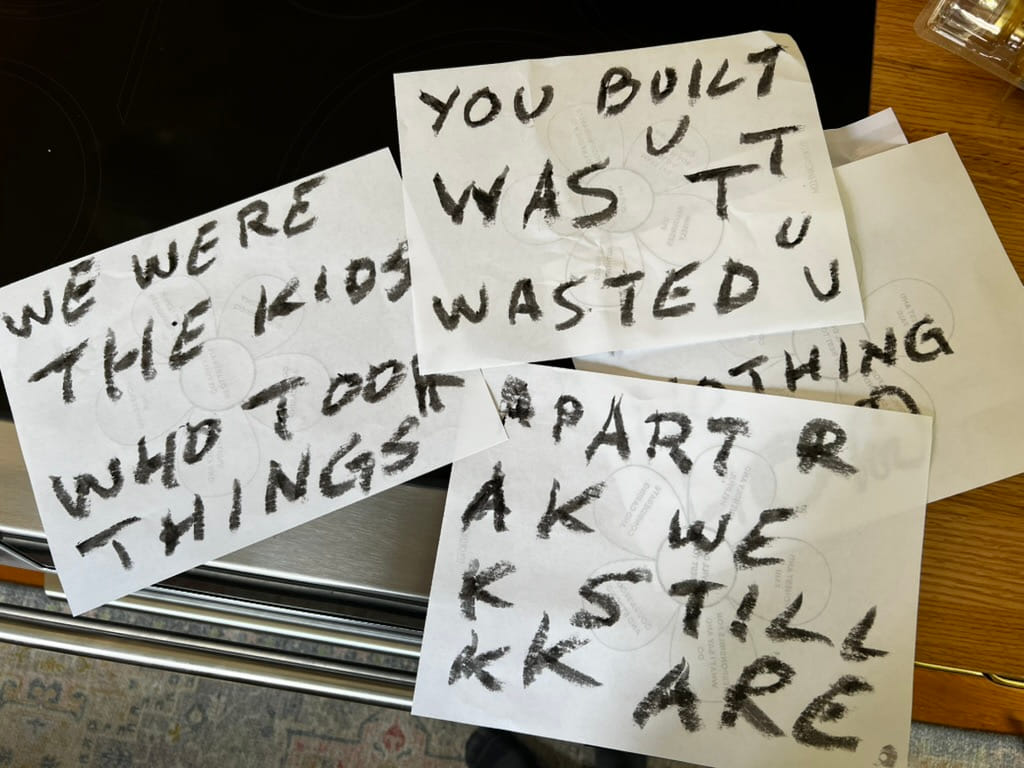
That chalkboard lettering started as black paint stick on sheets of paper. I scanned the sheets, flipped the strokes to white and keyed out the paper, so the letters sit straight on the black of the slide with their rough edges intact. The build just uncovers the scan one word at a time.
Rehearsing without saying a word
With the stage manager in code, I could run a full rehearsal without opening my mouth.
The tests read the entire script into the voice follower, word by word, the way a microphone would feed it. Then they do it again with each cue skipped in turn, and check that the deck still reaches the last slide without jumping early or skipping anything else. A second test throws a rougher read at the prompter: 8% of words dropped, 6% garbled, filler like “um” and “you know” sprinkled in, and an ad-lib dropped in at the casket:
const ADLIB = tokens('hang on let me get this lid open there we go sorry this thing is heavier than it looks okay');The rule is that the prompter can't run ahead of me, even when I go off script while fighting with a lid. (This one's lid turned out to be pretty light.)
Every time I changed a word in the script, the tests told me whether I'd broken a cue somewhere down the line. That happened a lot, because I rewrote the script right up to the day of the talk.
The prompt book
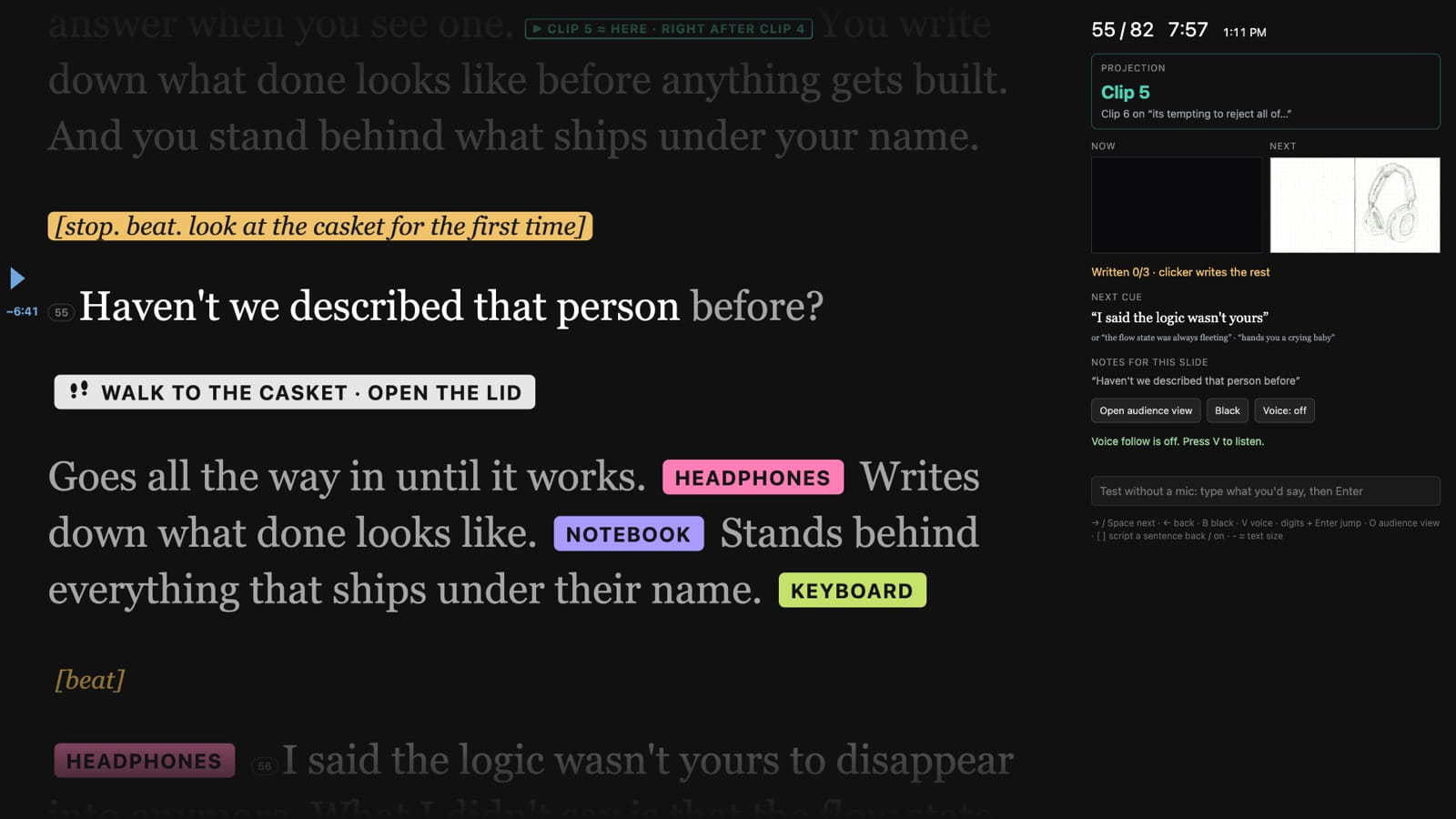
The presenter view is mostly the script itself, huge, for the confidence monitor at the lip of the stage. It follows my voice too. The word I'm about to say holds at a gold marker a third of the way down the screen, what I've already read dims, and the next few words glow.
The marker also keeps time. The talk was budgeted at 26 minutes and 50 seconds across six sections, so every word in the script has a moment it should be said by. Running long turns the marker amber, running ahead turns it blue, and a little gray tick in the margin shows the line the clock thinks I should be on. When a rehearsal told me where a line really landed, I pinned it in the script with something like [@23:15] and the pacing bent to match.
Stage directions became colored tags, because I was going to be reading them in a dark room under pressure. Pink for the headphones, purple for the notebook, green for the keyboard, and a white tag with little footprints on it for anywhere I physically had to walk, like over to the casket to open the lid.
A second stage manager
The screen behind me wasn't the only thing moving. Forward's venue team projection-mapped the whole room, washing the walls and ceiling in stained glass so the theater read like a chapel. That ran on its own rig, off my laptop entirely, as six long video clips (the longest close to nine minutes) that their operator fired by hand.
Which meant two stage managers calling the same show from different books. I didn't want their operator guessing when I'd reach the next section, so their cues went into my script too. Teal tags in the prompter mark the line where each clip comes in, and a box in the presenter view says which clip should be up, how long it has left (timed from when I actually reached its line), and which one is next. One clip doesn't start on a line at all, it starts when the one before it ends, so its tag is drawn as an outline at the spot where that should fall if I'm on pace.
Their software was Resolume, which has its own web server and REST API, plus OSC for firing clips with low latency. So the deck could have called those cues itself. The same matcher that hears “Dearly beloved” and brings up the headstone could have sent a request to the projection rig in the same breath, and the stained glass would have turned over on the word. It's a handful of lines of code. I just never thought to ask. Resolume ran on their machine, I was up at the podium, and the only connection between us was the cable they plugged into my laptop to put my screen up. It didn't cross my mind that there might be a way to reach their rig from mine, so their operator fired every clip by hand, and the teal tags were as close as the two systems got.
You write down what done looks like before anything gets built. ▶ Clip 5 ≈ here · right after clip 4 And you stand behind what ships under your name.
It's tempting to reject all of it. ▶ Clip 6
Renting a casket
The casket was its own little research project. The whole talk hangs on one sitting on stage, and when I started putting it together I had no idea how you get one. I didn't know if that meant calling a funeral home, whether anyone rents them out, whether a used one would be cheaper, or whether I'd even want a used one.
Theaters need caskets too, it turns out. Event Magic in Oakland keeps them as props, and they delivered one straight to the venue, which made the whole thing easy. The guy there had two to pick from, so I took my favorite.
I don't know where it came from before it was a prop, and I'm choosing to believe it's never had anyone in it. I opened and closed that lid plenty, and it was light enough that I doubt it was built like a real one.
Painting the wall Faded Denim
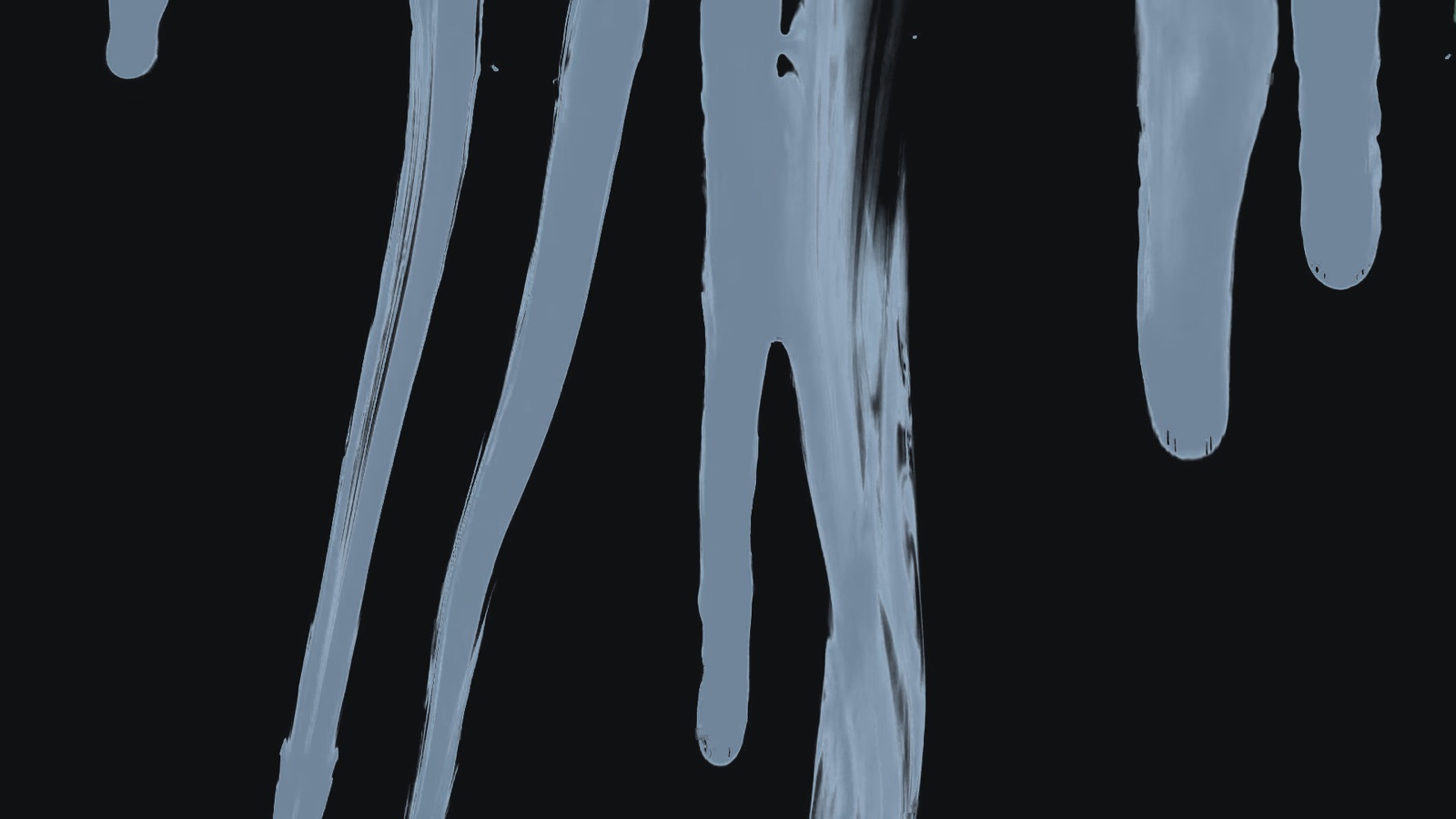
My office walls are a blue called Faded Denim, and the script comes back to that color at the end. When I say “painting their first office Faded Denim,” paint drips down the entire screen while a coat of it rises over everything, until the wall is solid blue on the clip's last frame.
My first attempt was a WebGPU shader written with TypeGPU, a paint pour and a paint roller simulated on the GPU. TypeGPU is vendored into the repo so the deck needs zero network at the venue. The shaders are still in there behind a flag.
What I used on the day is fourteen seconds of a free stock clip of dripping paint, slowed to half speed, inverted, and keyed into Faded Denim with an alpha channel so it sits on top of the slides. A mirrored copy, 20% larger and 0.9 seconds behind, fills the other side of the frame so the drips cover the full width.

Pencil and paper
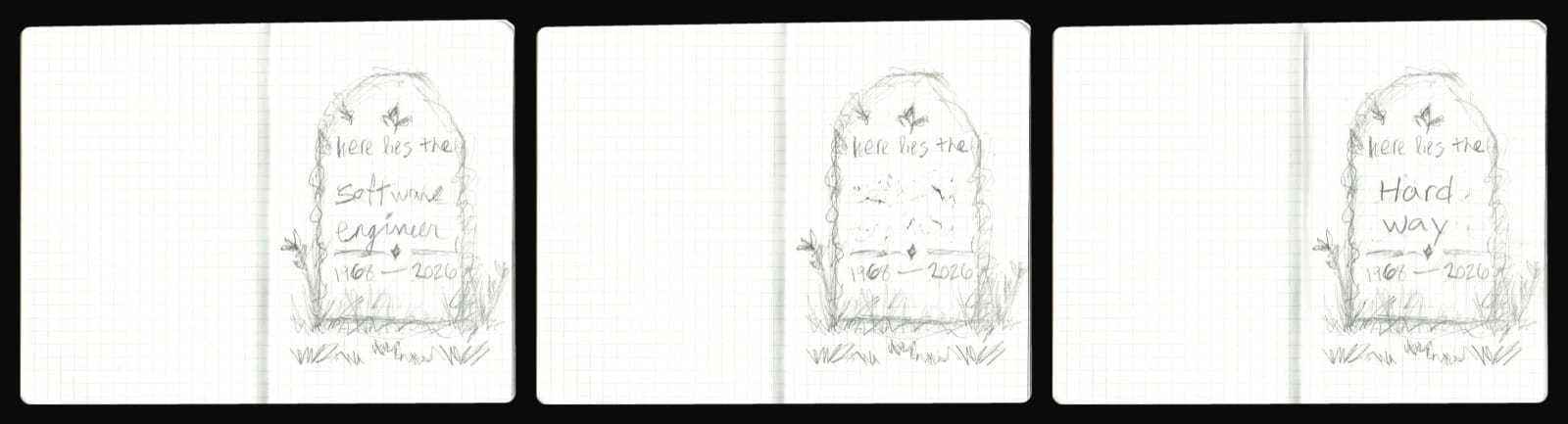
Nearly every drawing in the deck is me with a pencil in my notebook: the headphones, the notebook (yes, a drawing of the notebook, in the notebook), the keyboard, my amp, and a headstone.
I scanned the pages, and a small script straightens each one and crops the spreads to the same width with the spine dead center, so they line up perfectly from slide to slide. The headstone took three scans of the same page: the original, one with the name erased, and one with “Hard Way” written in. They're registered on top of each other so only the name changes. Late in the talk the name rubs out over three seconds, and later still the new words get written in, right on the paper.
The same trick works on photos. The script has a sacred box of wires that follows you from high school to college to your first apartment to your child's closet, so one tub of cables got shot on four different floors, and another script lines the photos up on the box. Each room cuts in on its word, and only the floor around the box changes.

Six thousand faces
There's a line in the talk about taking everything we ever made public and blending it together. I wanted to show that blend literally.

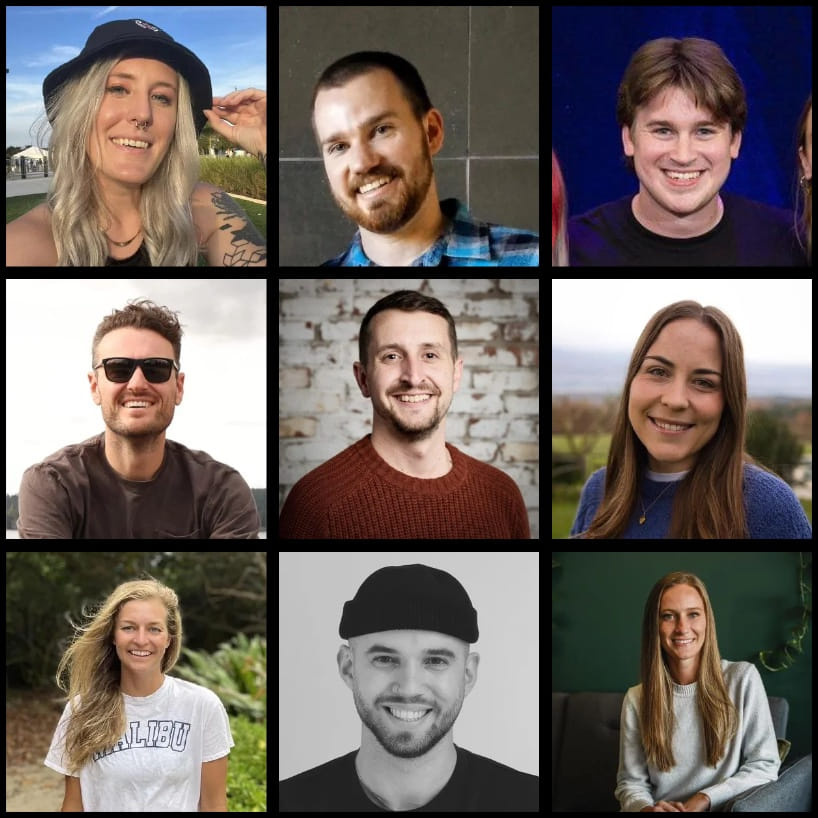
The slide is a canvas, a field of avatars 301 tiles across. It opens tight on my own face and pulls back through the tiles nearest mine (the other Forward speakers, the Resend team) out to a crowd of thousands. Zoomed all the way out, the crowd turns into a photomosaic of the blank default avatar, the gray head and shoulders every new account starts with. The faces themselves draw it: the brightest avatars make the figure and everyone else makes the background.
Getting there took a pile of scripts. One pulls avatars from X, the speakers' pages and GitHub (contributors, then followers of the speakers). Another throws out the logos and cartoons and keeps only tiles that actually have a face in them. A third adds about 1,500 developers you'd recognize, the most-followed people on GitHub whose avatar is a face. All told it's around 5,900 real people.
Then, on “you are the ingredient that doesn't blend,” the camera eases back in and drifts slowly across the crowd on a Lissajous curve, about one tile a second. In the stretch of wall where it wanders, every face is seated once and never repeats on screen.
People up front
The humans are the priority.
The machines are the background.
I never say “AI” in the talk. About twenty-seven minutes on what happened to our jobs, and the word doesn't come out of my mouth once. I don't think anyone in the room noticed.
That was on purpose. There's a real fatigue setting in. The word is in every launch video, every keynote, every product page and every post about the future of work, and at some point it stopped meaning much of anything and started making people tune out. I didn't want to hand a room full of developers one more talk they could file under the same heading.
The eulogy is about the people: the ones who went heads down for three hours until it worked, the ones who gave their work away, the six thousand faces on that wall. The machines sit in the background on screen too. A couple of the posts in the grief pile say it, and one photo shows ChatGPT open on a laptop. It's there if you look for it. I just never say it.
How it was made
You can probably see this coming. In the talk I confess to merging three thousand lines of code I never read, and then I say the job now is standing up in a room and describing your process, what you checked, and why it was enough.
So, my process: I built this deck with Claude Code over about four weeks and 123 commits, and I typed very little of it. What I did was describe what I wanted the room to feel and what had to be true on stage. It can't jump ahead. The prompter can't lose me at the casket. Nothing can depend on the venue's Wi-Fi. A missed cue has to recover by itself. Then I checked those things with tests that read my own script aloud, over and over, every time something changed.
Trying it yourself
- “Dearly beloved”
- “who gave away an operating system” (or Linus Torvalds, or Lee noose)
- “painting their first office Faded Denim”
- “Nothing you built was wasted”
The box above is a tiny copy of the deck's matcher: forward only, 60% of a long cue, one slip allowed, and the next two cues listened for in case you skip one. The real deck is a plain web page with no build step, so running it takes a static file server and Chrome:
python3 -m http.server 4810 --directory talks/eulogyOpen http://127.0.0.1:4810/?presenter for the prompter and press O to pop open the audience view in a second window (the two stay in sync). Press V, allow the microphone, and start reading the script out loud. The status line under the timer says whether it's listening on-device or online, and how much of the next cue it has heard so far.
No mic, or not in the mood to talk to your laptop? Type into the box under the timer and press Enter. The deck treats it the same as speech.
To keep your audio on your own machine, install Chrome's English language pack once. Open DevTools on the deck and paste this into the console:
await SpeechRecognition.available({ langs: ['en-US'], processLocally: true });
// 'downloadable' means you can grab it; 'available' means you already have it
await SpeechRecognition.install({ langs: ['en-US'], processLocally: true });
install() resolves to true once the pack is downloaded. Reload, press V again, and the status should read on-device. You can then pull the network cable and it keeps listening, handy when the only thing between you and your next slide is conference Wi-Fi shared with a few hundred developers. If available() comes back unavailable, your Chrome can't do it locally yet and you're on the online recognizer, which works fine but sends your voice to Google.
The whole thing comes down to the prompt book. Write the script you were going to write anyway, mark the lines where something should happen, and the stage manager can sit in the dark and call every cue while you look at the room.